

如下图的红区部分
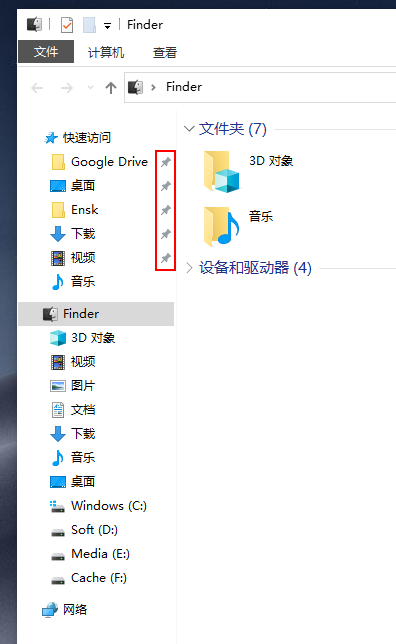
强迫症看着真不舒服
11 条回复 • 2021-06-04 16:23:15 +08:00
 |
1
xml123 2021 年 6 月 3 日
右键,从快速访问中取消固定
|
 |
2
tojohnonly OP @xml123 我是想固定到快速访问列表,但是去除掉后面的别针按钮
|
 |
3
summerwar 2021 年 6 月 3 日
应该没有办法,那个别针表示固定的意思
|
 |
4
szzhiyang 2021 年 6 月 3 日  1 1
如果没有别针图标,怎么体现这些项目有没有固定?
|
|
5
szzhiyang 2021 年 6 月 3 日
可以把 imageres.dll 中的图钉图标换成全透明的。
|
 |
6
3dwelcome 2021 年 6 月 3 日
强迫症建议先改一下文件夹背景颜色,纯白背景看着太刺眼了。
|
|
7
tojohnonly OP @szzhiyang 谢谢大佬,找到方案了
1 The solution provided by @Under A Tree seems to not work in Windows 10 Version 20H2. Here is an alternative solution. Install ResourceHacker Take control of your C:\Windows\SystemResources\imageres.dll.mun file. This can be done by opening CMD then inputting these commands cd C:\Windows\SystemResources takeown /f "%cd%" /r /d y icacls "%cd%" /grant Everyone:(OI)(CI)F /t /q Make a copy of your C:\Windows\SystemResources\imageres.dll.mun file create or download a transparent icon open ResourceHacker and the C:\Windows\SystemResources\imageres.dll.mun file click on Click on Icon Group find 5100:1033 Select the icon and click control + r Select the transparent icon Use control + s to save https://superuser.com/questions/1442992/remove-the-grey-pins-from-quick-access-in-windows-10/1609090 |
|
8
szzhiyang 2021 年 6 月 3 日
@tojohnonly 别客气,我个人主页上的软件可以帮你更快地打开常用文件夹。
|
 |
9
syuraking 2021 年 6 月 3 日
@tojohnonly WIN 系统更新试试看,九成是不能正常更新了
|
|
10
tojohnonly OP @syuraking 只是修改了一个文件,更新了下系统没啥问题
|
 |
11
tankren 2021 年 6 月 4 日
pin 啊 pin 就是图钉、、、
|